Anomaly Detected Entities
Roster hub for object anomalies, Intruders, and what to report before 6 AM.
Entities hub for Anomaly Detected
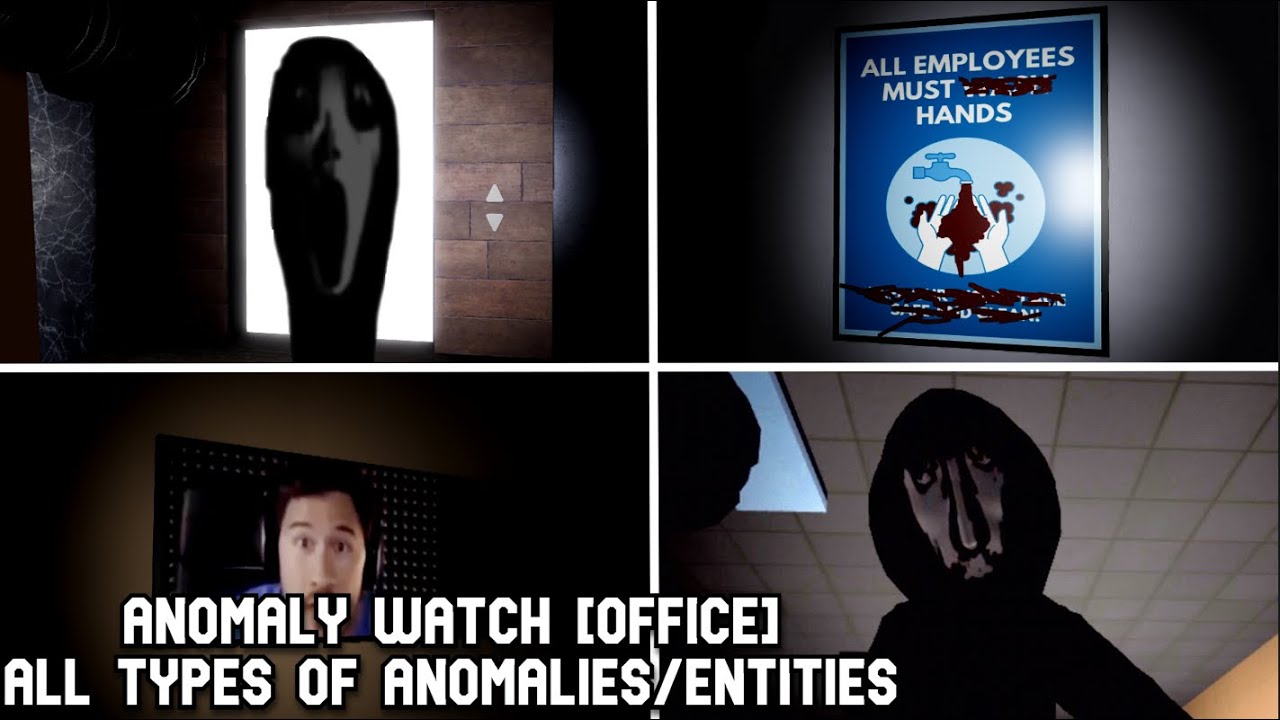
In most Roblox wikis, a “Players” category means character rosters. Here it means the things that break reality—the anomaly classes and Intruders you must recognize to keep a shift alive. This hub is your entity field manual for Anomaly Detected (Anomaly Watch on Roblox).
You are not building a fighter loadout. You are building a mental bestiary: what can move, vanish, duplicate, distort, glow wrong, appear as impossible imagery, or walk in as an unrecognizable hostile. Report correctly on the tablet, escalate Intruders first, and survive until 6 AM.
Child pages
Anomaly types
Deep dive on Moved Object, Extra Object, Missing Object, Strange Imagery, Strange Light, Distorted Object, and Other—with miss-risk notes per class and map-aware tips for House, Office, and Church.
Intruders
Hostile priority targets: why Intruders sit at S-tier on the Tier List, how Evident threat becomes Unreportable, and co-op callout patterns that stop wipes.
Threat meter vs entity types
Entities are what you see; the threat meter is how the game scores your negligence:
- None — shift feels clean; keep scanning baselines.
- Mild — something is wrong; find and report before multitasking.
- Vague — pressure rising; Intruder checks override tidy object hunts.
- Evident — emergency mode. If an Intruder caused this and you stall, Unreportable wipe risk spikes.
Object anomalies can distract you into ignoring the meter. Entity knowledge only helps if you pair it with How to Survive Intruders and How to Report Anomalies.
Quick roster (classification cheat sheet)
| Class | What “wrong” usually looks like | Priority |
|---|---|---|
| Intruder | Unrecognizable humanoid / creature presence | S — report immediately |
| Missing Object | Expected prop gone | A |
| Extra Object | Prop that should not exist | A |
| Distorted Object | Warped shape/texture on a known prop | A |
| Strange Imagery | Images, portraits, screens lying | A |
| Moved Object | Known prop in wrong place/angle | B |
| Strange Light | Impossible lighting / hue / flicker | B–A (Office↑) |
| Other | Wrong but uncategorizable | C utility |
Full prose definitions live on anomaly types. Intruder behavior and wipe prevention live on Intruders.
Map-specific entity pressure
- House — clearest teaching environment for object classes; still punish Intruder neglect. Walkthrough: House.
- Office — lighting and sprint tunnel vision hide Missing / Light / Distorted tells. Walkthrough: Office.
- Church — densest simultaneous anomaly load; entity ID speed matters most. Walkthrough: Church.
Use the Tier List Hub if you need the short ranking without roster detail.
Co-op roles for entity coverage
- Intruder lead — watches hallways and open sightlines; tablet prepped on R / mobile side button.
- Props lead — owns Moved / Missing / Extra / Distorted checks along a route.
- Imagery & light lead — verifies art, screens, lamps, impossible glows (critical on Office/Church).
- Meter caller — announces Mild / Vague / Evident so the lobby shares urgency.
Rotate roles weekly so everyone can classify under stress—not only the “main reporter.”
Linked skill guides
Entity pages tell you what. These guides tell you how:
- Getting Started
- How to Play
- How to Report Anomalies
- How to Survive Intruders
- Full list on the Guides Hub
Codes, scripts, and entity “cheats”
There are no verified active promo codes as of September 2026 (Codes). ESP-style Scripts (including UWU HUB mentions) may highlight entities but risk bans and rot your recognition skill. Learn the roster with your eyes; use tools only if you accept losing the account.
Updates that affect entities
The v.101 package added Church, leaderboards, win counts, and hardmode—raising how often you must ID entities quickly under density and competitive pressure. Details: Updates Hub. Fundamentals (eight report classes + Intruder priority) remain the spine.
How to study this hub efficiently
- Skim the cheat sheet table above.
- Read anomaly types with a House private practice mindset.
- Read Intruders the night before a Church grind.
- After each wipe, write down the class you misreported and drill only that class next run.
- Return to the Wiki Overview when you need non-entity systems (codes, scripts, patch notes).
Mastering entities will not remove the horror—it makes the horror fair. When the chair has moved and something stands in the hall that should not have a face, you will already know which tablet line to hit.
Frequently Asked Questions
Quick answers to the most common questions.
Why is this called a Players Hub if it covers anomalies?
On this wiki the Players category is the entities / roster hub—anomaly classes and Intruders—rather than human character builds.
What is the difference between anomaly types and Intruders?
Anomaly types focus on object and environment classes you report on the tablet. Intruders are hostile entities that must be prioritized to avoid Unreportable wipes.
Which entity should I worry about first?
Intruders. Object anomalies matter for clean shifts, but Intruders drive the threat escalations that end runs.
Where can I see all anomaly classes listed?
Open the anomaly-types child page for full definitions, or use the quick roster table on this hub for a mid-lobby refresher.
Do new maps add new entity classes?
Church increased density and layouts, but the core report classes remain the same. Always re-learn room baselines when a map is new to you.